CSS Background Styling : Background Color Of Document
In order to give some Background Effects to HTML Document following properties are used -
| No | Properties Used For Styling |
| 1 | background-color |
| 2 | background-image |
| 3 | background-repeat |
| 4 | background-attachment |
| 5 | background-position |
Property 1 : Background Color
- It specifies the background color of the element.
- Background Color can be specified to an element or to complete page or division.
- Background Color of Complete page is specified by writing background-color property in body selector.
Syntax :
background-color: {Name}|{Code}|{Combination};
Different Ways of Specifying Background Color
| HEX value : | #FF0000 |
|---|---|
| RGB value : | rgb(255,0,0) |
| Color Name: | red |
CSS Color Values :
RGB Color :
- Hexadecimal Color values Supported in all major browsers.
- A hexadecimal color is specified with: #RRGGBB
Code Composition RR Red Color Composition GG Green Color Composition BB Blue Color Composition
- All values must be between 0 and FF.
- Example : #FF0000 is Red Color because First Value of Red Color Composition is Set as RED.
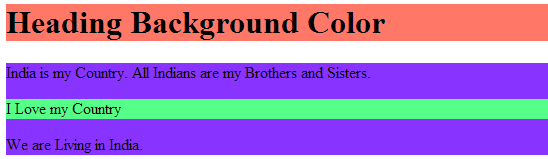
Live Example :
<!DOCTYPE html>
<html>
  <head>
    <style>
      h1
      {
        background-color:#FF7766;
      }
      p
      {
        background-color:#55FF88;
      }
      div
      {
        background-color:#8833FF;
      }
    </style>
  </head>
  <body>
    <h1>
      Heading Background Color
    </h1>
    <div>
      India is my Country. All Indians are my Brothers and Sisters.
      <p>
        I Love my Country
      </p>
      We are Living in India.
    </div>
  </body>
</html>
Output :